Do You Need to Switch to Google Analytics 4? If you are still using Universal Analytics, the previous version of Google Analytics, Google has indicated that you will need to upgrade to Google Analytics 4.
This means if you want to get the most out of the tool, you will need to upgrade your implementation and start using the latest version.
We are here to help you by sharing some reasons why switching is a good idea.
But before discussing the reasons for shifting from UA to GA4, let’s discuss what Google Analytics 4 is.
What is Google Analytics 4
Google Analytics 4 is a whole new version of Google Analytics that requires all online properties to use the “App+web” setup.
The primary reporting indicator has shifted from page views per Session to Events. This implies this is better suited to those who have both an app and a website and wish to track. Plus, those who want to analyze individual activity more effectively across both.
Reasons Why you are Required to Switch to GA4
The following are the reasons why you must shift to Google Analytics 4:
1. User Privacy and More Intelligent Tracking Features.
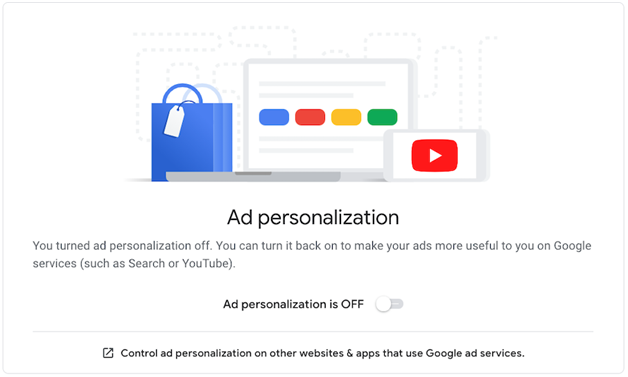
Google Analytics 4 provides you and your users with simpler and precise control over what personal data is collected, allowing you to comply with existing and future privacy rules.
For example, you may omit specific events and user characteristics from ad personalization with GA4.
Google’s new analytics method is built from the ground up to be more adaptable and flexible in the future when cookies will be far less popular and privacy will be a growing concern for both users and regulators.
GA4 has a flexible approach to measuring and will, in the not-too-distant future, use modeling to fill in the gaps where data may be lacking.
GA4 allows you to track organic leads and conversion rates. This shows that GA4 is essential to track SEO work of any business website.
2. Google Analytics is Exclusively Designed to Face Forward
GA4 will soon become the industry standard for analytics. The new GA4 property, like all Google Analytics properties, will only gather data from the time it was created.
Past data from UA properties will not be imported. As a result, we recommend deploying GA4 right now if you want more data.
3. It is Simple to Upgrade to Google Analytics 4
It is straightforward to upgrade UA on your website if you are already using it. Go to google.com/analytics first. Go to the account you want to use. Select “upgrade to GA4” from the property column.
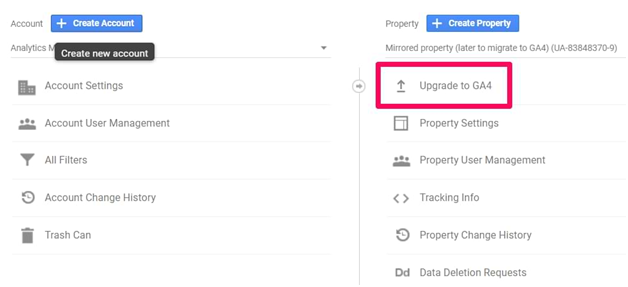
Select “Get started” under “I need to establish a new Google Analytics 4 property”. If gtag.js is installed on your analytics instance, you may choose the “Enable data collection using your existing tags” option.
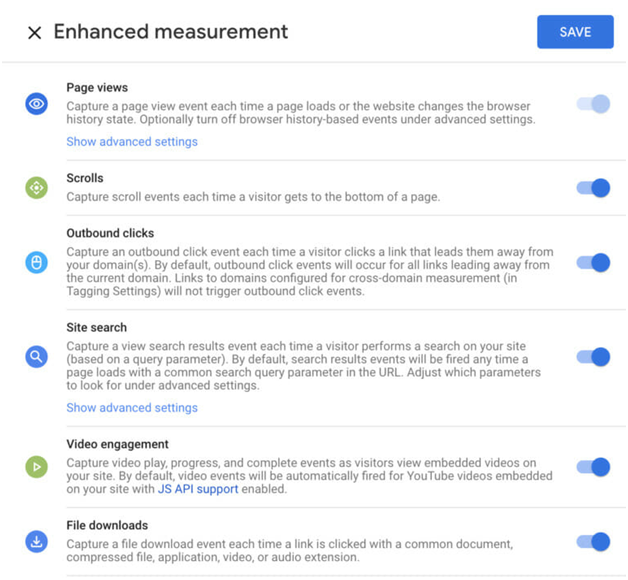
If you are using Tag Manager, you will need to do this manually. You will go to the stream details page after you have created the property to adjust the settings. Under “Enhanced Measurement” you can modify which events are recorded, although we recommend leaving all events enabled.
It’s time to get the tracking code on your site after you have configured your event measurement. If you are already using gtag.js for UA, simply add another line of code to your existing tag.
You will need to add a GA4 tag to your existing container if you are using Tag Manager. Do not get rid of your UA Tag.
You will only need a new GA4 ID to set up your GA4 tag. And you will set your trigger to fire on every page view, exactly like the UA base tag.
4. More Enhanced Features are on the Way
You will be able to move more features from the UA property to your GA4 property as we progress. Currently, GA4 attributes do not have filtering capabilities, although this may change in the future.
5. You Will Have a Lot More Options
Users can generate custom reports for the data they require in Google Analytics 4 and are encouraged to do so.
The amount of irrelevant, pre-made reports are easily reduced as a result of this. In this approach, your dashboard is less cluttered. You may find the most critical data for your organization faster, allowing you to make better-informed decisions faster and enhancing the effectiveness of your website and/or app.
6. Possibilities for Additional Segmentation
GA4’s audiences enabled more targeted campaign segments. You may create segments based on events, which was previously unavailable in UA. Plus, you can also include the concept of time if desired.
As a result, you can now focus more on users and their interactions rather than wasting time dividing data by device or platform type.
You can also do a lot more with your segment if you add the concept of time, such as analyzing the time users spent between phases in your sales funnel.
It is also worth noting that whatever audience you publish to will be automatically shared with Google Ads. When you run a campaign, the particular audience you want to attract will be right there.
Now, let’s discuss how to switch to Google Analytics 4.
How to Switch to Google Analytics 4: Step-by-Step
Step 1: Log in to Google Analytics and navigate to the Admin panel.
Step 2: Under the “Property” column, see if a GA4 property is listed. If not, continue to the next step.
Step 3: In your UA property, go to Admin > GA4 Setup Assistant. Click on “Get Started” and follow the prompts. Google will auto-create a GA4 property with basic settings copied from UA.
Step 4: If you’re using Google Tag Manager, add the GA4 Configuration tag with your new GA4 Measurement ID. If not, manually install the GA4 gtag.js code on your site.
Step 5: GA4 tracks events instead of goals. Go to Admin > Events to define and mark events as conversions.
Step 6: Under Admin > Product Links, connect GA4 to Google Ads, BigQuery, or Search Console to streamline your marketing insights.
Step 7: Use the Real-Time Report in GA4 to confirm your property is collecting data. Give it 24 hours to populate detailed reports.
Concluding Notes
So, I hope you have understood how to switch to Google Analytics 4. GA4 is expected to be more powerful than Universal Analytics. And it offers more relevant information about why users are present on your website or app. It permits you to aggregate the data from multiple data streams into one property and assign actions to users more accurately across devices.
While GA4 won’t provide you with all of this information right away, implementing it early will allow you to benefit from the increased experience and data as early as possible.